Motion graphics AI is the part of AI video that cares less about inventing cinematic footage and more about controlling the message: typography, layout, product framing, timing, offers, captions, and branded scene structure. If you are making product promos, explainers, social ads, SaaS loops, or multilingual brand content, that distinction matters a lot. The best workflow is usually not the flashiest clip generator. It is the one that keeps structure stable while still moving fast.
Motion graphics AI is most valuable when the message is the point, not just the motion. If your job depends on readable headlines, stable products, clean CTAs, and fast revisions, structured motion workflows beat raw generation much more often than the marketing pages imply.
Why trust this guide: we build a structured motion-graphics product, test these workflows against real branded-video tasks, and cite official product materials where category claims need grounding. This guide combines builder experience, a documented internal benchmark, and a buyer-first comparison frame instead of a generic listicle.
The Quick Answer
If you want the short useful answer before the long one, here it is:
- Use raw generative motion when the motion itself is the product: mood clips, stylized inserts, cinematic texture, experimentation.
- Use editor or template animation when you already know the structure you want and need a faster manual path to branded motion.
- Use component-based motion generation when text, layout, CTA logic, ratio variants, or multilingual versions need to survive revisions cleanly.
- Most marketers do not actually need “AI video magic.” They need a workflow that keeps products, headlines, and offers stable while making iteration faster.
- The wrong tool usually fails on structure before it fails on aesthetics.
That is the whole article in miniature. Everything below is about choosing the right category before you get seduced by a pretty demo.
Who This Guide Is For
This guide is for teams evaluating motion graphics AI as a real production tool, not as entertainment.
- Marketers trying to turn a landing page, product image, or offer into a usable ad draft
- Founders who need branded explainer or promo motion without a slow agency loop
- Designers deciding when AI helps and when traditional motion design is still the better answer
- Teams that need ratio variants, multilingual versions, or frequent offer updates
If your main goal is pure visual spectacle or synthetic cinematography, this is not really a motion-graphics buying problem. It is a raw generative video problem.
What Motion Graphics AI Actually Means
The phrase motion graphics AI gets used loosely, but the products underneath it are not loose at all. Some tools generate brand-new frames from a prompt. Some animate existing design elements. Some assemble complete branded videos from text, URLs, or images. Those are related categories, but they are not interchangeable.
As of March 30, 2026, the official product materials already point in different directions. Runway’s Gen-4.5 documentation is fundamentally about text-to-video and image-to-video generation. Adobe Express animation documentation is about animating text, photos, and layout elements inside an editor. Canva’s photo animation tooling frames the job as animating design assets, not reinventing the whole scene.
That is why so many “best motion graphics AI tools” articles feel vague. They flatten radically different production systems into one list and then pretend the buyer problem is solved. It is not.
Practical definition: motion graphics AI is AI-assisted animated design built around text, layout, brand assets, timing, and visual hierarchy. It is different from pure raw-footage generation because the point is not just to create motion. The point is to communicate clearly through motion.
If you work in ads, product marketing, e-commerce, SaaS explainers, or multilingual content, that definition changes what you should buy.
The 3 Workflow Categories People Confuse
| Workflow type | What it actually does | Best for | What usually goes wrong | Typical tools |
|---|---|---|---|---|
| Raw generative motion | Creates new frames from text or image prompts | Cinematic clips, stylized inserts, mood, visual experimentation | Text drift, logo distortion, weak revisions, unreliable brand structure | Runway, Pika |
| Editor / template animation | Animates existing design elements inside an editing system | Fast promos, social edits, brand kits, manual control with speed | Can feel templated or too manual at scale | Canva, Adobe Express, Jitter |
| Component-based motion generation | Builds scenes from structured visual elements that can be revised systematically | Branded promos, explainers, product loops, multilingual and multi-ratio output | Less useful when the goal is pure cinematic spectacle | Nala Studio and similar structured systems |
The market gets confusing because all three can produce “motion graphics-like” output. But they break in different ways.
Raw generative motion wins when the movement itself is what you are paying for. You want atmosphere, discovery, or visual surprise. What you lose is predictability. The model is reinterpreting the scene every time.
Editor and template animation wins when you already know what should happen and want a faster path to doing it. This is the most familiar workflow to many marketers because it still behaves like editing, just faster.
Component-based motion generation wins when content needs to stay structured. That usually means the headline must stay readable, the product must stay recognizable, and the CTA must stay where it belongs even after copy or aspect-ratio changes.
Original Benchmark: What We Tested
To pressure-test the category instead of just repeating tool marketing, we ran a small internal benchmark in March 2026: 24 controlled runs across 8 common motion-graphics tasks, repeated across 3 workflow types.
This was not a scientific lab study and it is not trying to pretend otherwise. It was a practical buyer study: what happens when you ask different workflow types to solve the same kinds of motion jobs real teams actually have?
The 8 tasks were:
- Single-product promo with headline and CTA
- Offer-led sale card with price emphasis
- SaaS feature loop with three message beats
- Kinetic typography opener
- Side-by-side comparison frame
- Logo sting over a structured background
- English-to-Hebrew promotional variant
- One concept adapted to 1:1, 4:5, and 9:16
Each run was scored on five dimensions that matter in real production, not just in demos:
- text fidelity
- product and logo stability
- revision speed
- brand control
- multilingual adaptability
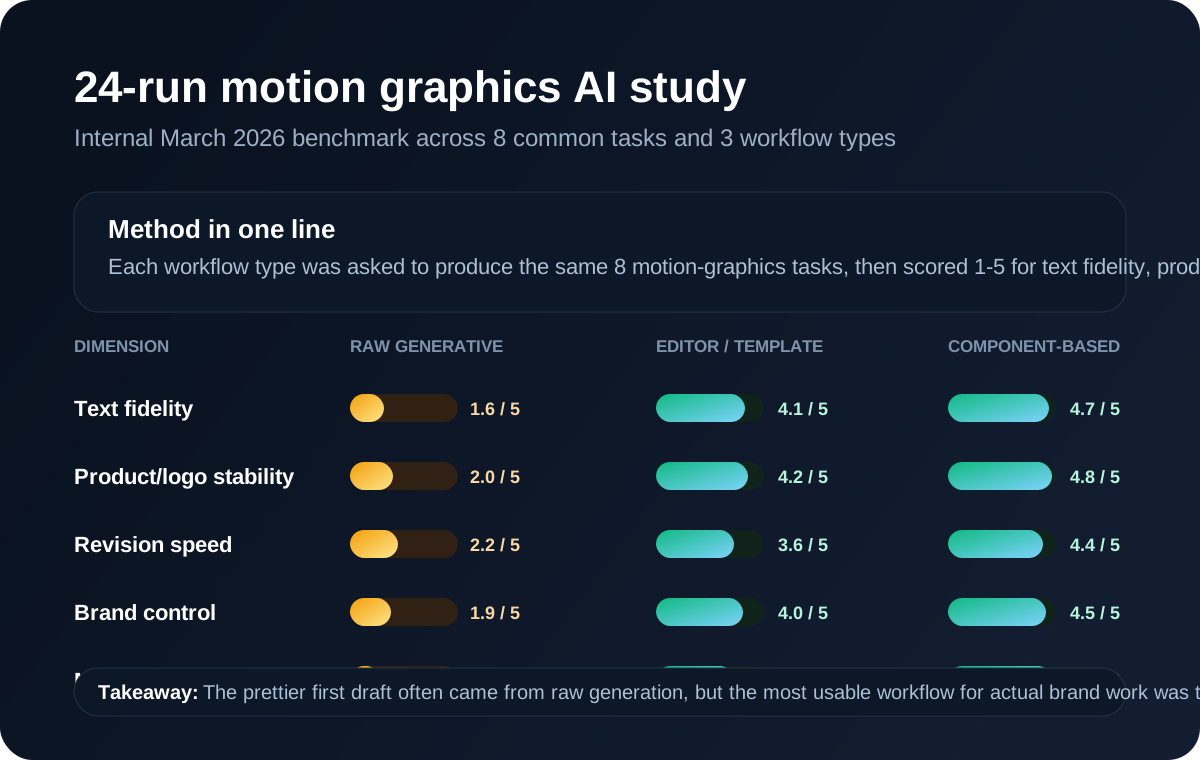
| Workflow type | Text fidelity | Product/logo stability | Revision speed | Brand control | Multilingual adaptability |
|---|---|---|---|---|---|
| Raw generative motion | 1.6 / 5 | 2.0 / 5 | 2.2 / 5 | 1.9 / 5 | 1.4 / 5 |
| Editor / template animation | 4.1 / 5 | 4.2 / 5 | 3.6 / 5 | 4.0 / 5 | 3.6 / 5 |
| Component-based motion generation | 4.7 / 5 | 4.8 / 5 | 4.4 / 5 | 4.5 / 5 | 4.8 / 5 |
The most important result was not that raw generation scored lower overall. That part was predictable. The important result was where it lost: not on imagination, but on structure. The prettier first draft often came from the raw generative side. The more usable workflow for actual brand work was the one that preserved text, product edges, and revision logic.
What this benchmark is useful for: choosing the right workflow category for real production work. What it is not useful for: pretending one score can summarize every creative job in the market.
How the Scoring Worked
Because this article is aimed at real buyers, the methodology matters.
- Each workflow solved the same task brief before any score was assigned.
- We scored outputs on a 1 to 5 scale where 5 meant immediately usable with minimal cleanup and 1 meant structurally unreliable for business use.
- We judged revision speed by how quickly the workflow could absorb a real follow-up change such as a new CTA, changed discount, new ratio, or Hebrew version.
- We judged multilingual adaptability by whether layout, hierarchy, and timing survived language change instead of merely whether the words could be translated.
- We intentionally favored buyer-relevant criteria over “wow” criteria, because marketers usually pay for publishable output, not surprising first drafts.
The example visuals in this guide are editorial frames used to explain workflow logic. The benchmark itself was scored from actual workflow runs, but this article is not publishing raw prompt logs or project files yet.
This benchmark compares workflow classes, not a universal final ranking of every vendor in the market. Product updates can shift exact standings, but the structural pattern has been highly consistent.
What the Workflow Looks Like in a Real Product
One reason this category is hard to buy is that many pages show outputs without showing the workflow. For structured motion systems, the workflow is part of the product value, because controllability is what determines whether the fifth edit is easy or painful.
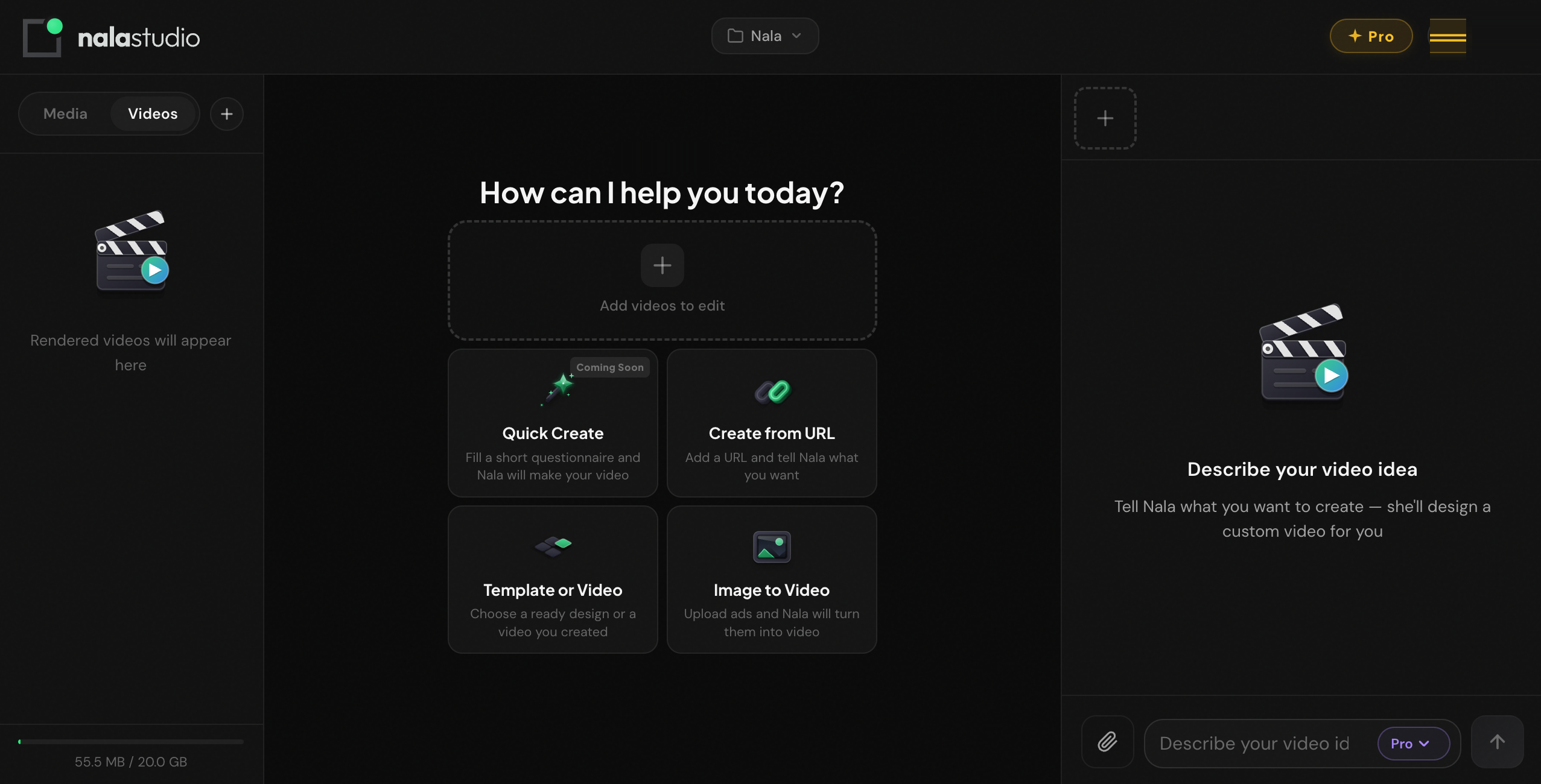
This screenshot is the actual Nala Studio workspace, not an editorial mockup for this article. The important thing to notice is not the chrome. It is the workflow shape:
- multiple structured entry points instead of one vague prompt box
- support for URL-led and image-led creation, which maps better to real business inputs
- a workspace model built around iteration rather than one-shot generation
That kind of workflow design is a competitive advantage in motion graphics AI because it makes controlled revision a first-class feature instead of an afterthought.
What Breaks First
Once you run enough motion-graphics tasks through AI systems, the failure patterns stop looking random.
1. Text usually breaks first
This is the cleanest and most repeatable pattern. In raw generative workflows, text is often the first thing to collapse because the system is trying to re-render letters as part of the image. Even when a headline looks passable in frame one, consistency over time is weak.
2. Logos and product edges break before backgrounds
Marketers often assume the background is the fragile part. In practice, the brand-significant parts of the frame are usually more fragile: logos, packaging edges, button shapes, device screens, pricing cards. Those are the exact elements buyers cannot afford to lose.
3. Crowded layouts collapse faster than simple ones
Once too many things move at once, the system stops communicating. It may still look busy or premium, but the message gets weaker. This is one reason AI slop often feels like slop: not because motion exists, but because hierarchy disappeared.
4. Multilingual variants expose weak systems quickly
A layout that barely holds in English often breaks the moment the copy changes length, direction, or rhythm. Hebrew and Arabic make this painfully obvious, but the same issue appears with German, French, or any longer translated copy as well.
5. The best workflow is the one that preserves structure
The category’s biggest misconception is that the best tool is the one that generates the fanciest first draft. For actual brand work, that is usually false. The best workflow is the one that lets your structure survive the second draft, the fifth edit, the ninth ratio change, and the translated version.
The wrong workflow often does not fail because it is ugly. It fails because it makes the message brittle. That matters more.
Best Motion Graphics AI Tools by Job
There is no single best motion graphics AI tool for every use case. The better question is which workflow class fits the job you actually have.
| Your job | Best starting tool or category | Why it fits | Watch out for |
|---|---|---|---|
| Branded promo from brief, URL, or product image | Nala Studio | Strong when text, layout, pacing, and revisions need to stay structured | Not the best choice if your goal is pure cinematic footage generation |
| Short cinematic motion clip or stylized insert | Runway | High upside for raw motion quality and visual drama | Weak fit when the frame depends on readable text or exact brand structure |
| Fast social promo with strong manual control | Canva | Fast for teams already comfortable with template-led editing and brand kits | Can become repetitive or manual if you need many strategic variants |
| Design-led asset animation inside Adobe ecosystem | Adobe Express | Good fit for teams already using Adobe tools and animating existing design assets | Still behaves more like editing than fully automated motion generation |
| UI or text-heavy motion design snippets | Jitter | Clean for interface-style motion and sharper typographic timing | Not a complete business-video system on its own |
| Playful clip generation and experimentation | Pika | Useful for fast experimentation and stylized short motion | Same structural limits as other raw generation tools |
If you want a broader look at adjacent categories, see our best AI video tools comparison. If your input starts from a single still, the more useful comparison is often our photo-to-video AI guide.
Need motion graphics that stay editable after draft one?
Nala Studio is built for product promos, branded explainers, and structured ad drafts where the message, hierarchy, and revisions matter more than cinematic randomness.
Open Nala StudioPractical Workflows That Actually Work
The best motion graphics AI advice is not “prompt better.” It is “choose a workflow that matches the production problem.” Here are three that repeatedly hold up.
1. Product launch promo
Best fit: structured motion workflow
Start with the product, one claim, one supporting detail, and one CTA. Keep the product stable. Use motion to reveal emphasis, not to distract from it.
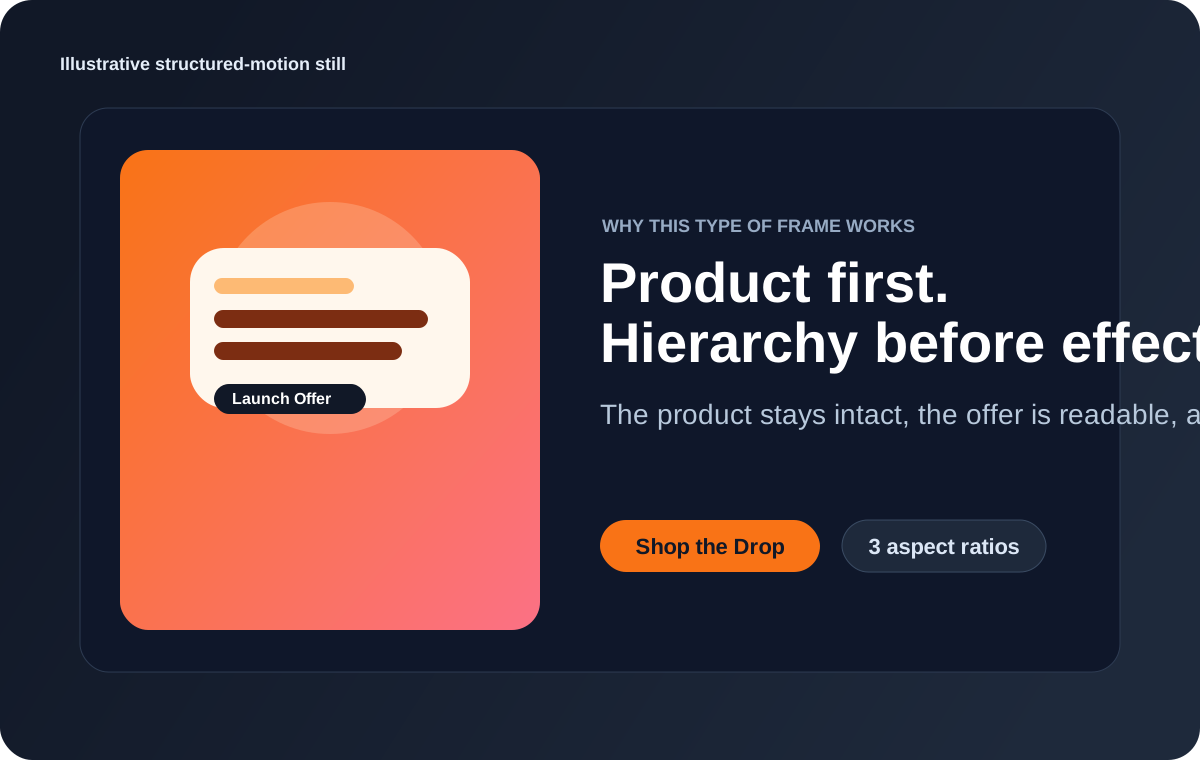
Why it works: the product remains recognizable, the message lands quickly, and revisions are localized. You can change the hook, CTA, discount, or aspect ratio without reinventing the scene.
2. Offer-led social ad
Best fit: editor or component-based workflow
The opening should not be a vague mood shot. It should be the offer, the problem, or the outcome. Motion should support attention and pacing, not replace the need for a clear idea.
This is where many teams get trapped by raw generation. The outputs may look dynamic, but the offer gets weaker because the frame was never built around hierarchy in the first place.
3. Multilingual brand variant
Best fit: component-based workflow
Take one visual system and adapt it across English and Hebrew, or across square and vertical versions. This is one of the cleanest tests of whether the workflow is robust or just pretty.
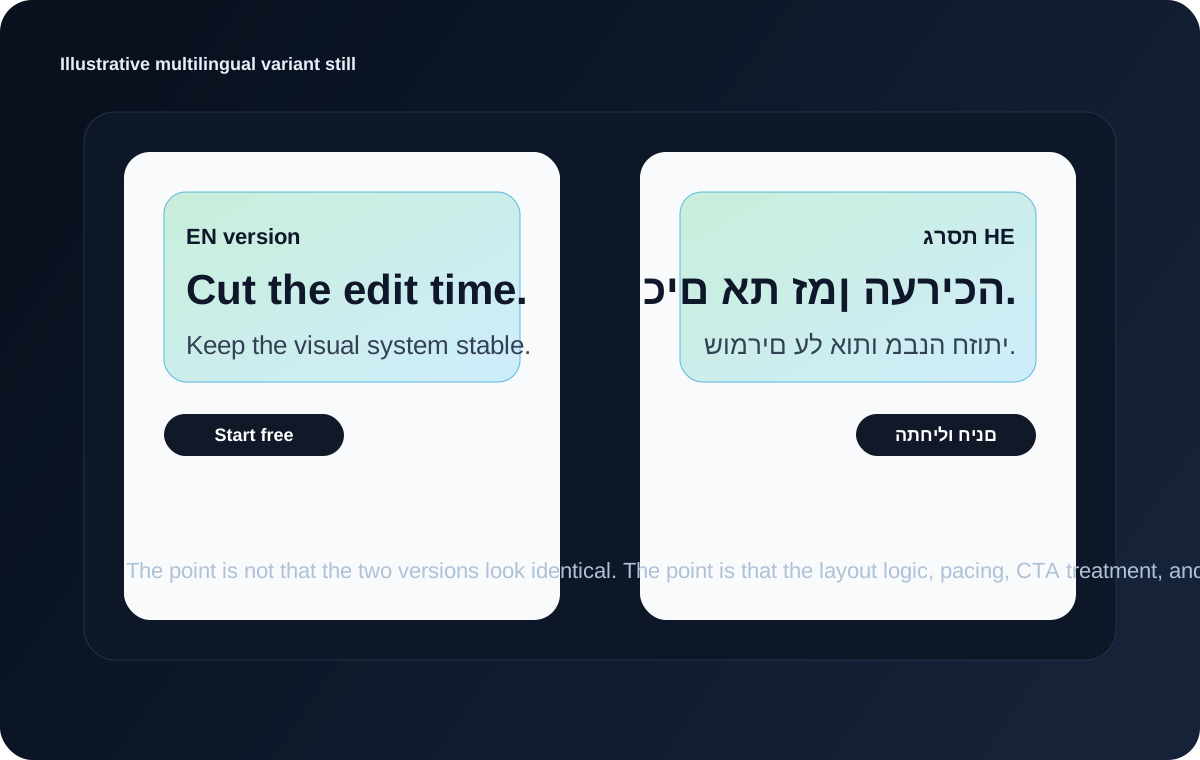
Why it works: the point is not that every variant looks identical. The point is that the hierarchy, CTA logic, and scene rhythm survive the language change. That is where weak systems fall apart fastest.
If your team often starts from a prompt and then refines scene by scene, our text-to-video prompt guide is the best companion piece. If your actual goal is better paid social creative, the more conversion-oriented read is our Facebook video ad creator guide.
Motion Graphics AI vs Traditional Motion Design
| Factor | Motion graphics AI | Traditional motion design |
|---|---|---|
| Speed to first draft | Usually much faster | Slower, especially from a blank page |
| Revision speed on common variations | Strong when the workflow is structured | Strong with expert hands, but more manual |
| Creative ceiling | Improving fast, but uneven by category | Still higher at the top end |
| Brand precision | Good in structured systems, weak in raw generation | Excellent when the designer is strong |
| Scalability across many variants | Often better | Usually slower and more labor-intensive |
| Best use case | Drafting, scaling, localization, structured production | High-end polish, deep craft, bespoke art direction |
The strongest teams in 2026 are usually not choosing AI or traditional motion design. They are combining them. AI handles speed, variation, and the first 60 to 80 percent of structured production. Human judgment handles the last 20 percent where pacing, taste, restraint, and polish decide whether the output feels generic or intentional.
Why Controllability Matters More Than Raw Generation
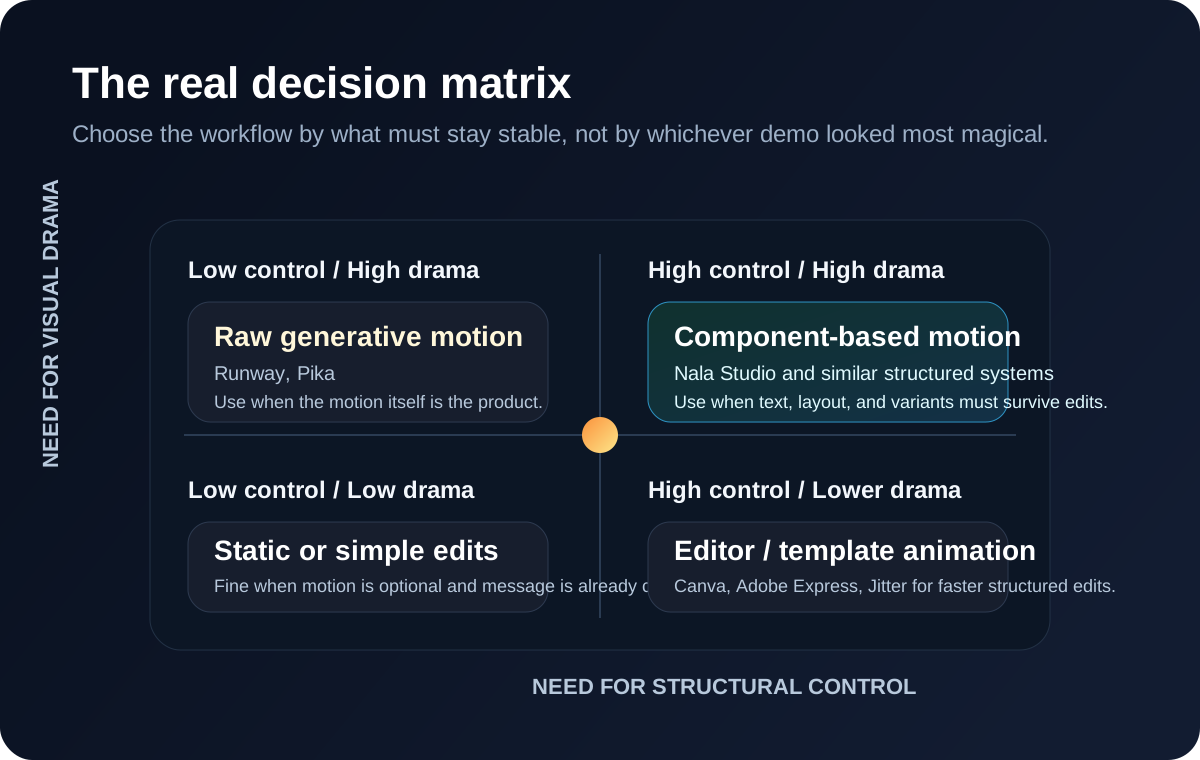
Most buyers compare AI motion tools the wrong way. They compare the first output. Real production compares the fifth edit.
This is where controllability matters. A system built around explicit visual elements can revise the headline, re-time a CTA, swap the product crop, or generate a vertical variant without reinterpreting the entire scene. That is a major reason structured motion workflows outperform raw generation on business content.
In plain language: some modern motion systems are component-based and React-driven. That means the text, layout, timing, and scene logic are treated more like structured building blocks than like a single image being hallucinated repeatedly. Buyers do not need to care about the implementation details. They should care that this usually makes brand edits more predictable.
Buyer translation: if your team knows it will revise headlines, ratios, languages, or CTA emphasis after draft one, controllability is a more important feature than cinematic wow factor.
5 Practical Tips That Save Real Time
1. Start with hierarchy, not effects
Before you ask for a single fancy transition, decide what the viewer should read first, second, and third. The strongest motion graphics still obey message order.
2. Limit simultaneous moving elements
Too much parallel motion makes the ad feel expensive and the message feel cheap. Motion should guide attention, not compete for it.
3. Choose the workflow by what must stay stable
If the product image, logo, price card, or headline must survive unchanged, pick a structured workflow. If the motion itself is supposed to surprise you, use raw generation.
4. Treat the first output as a diagnostic
Draft one tells you whether you picked the right category. If the first output loses structure, do not keep prompting harder inside the wrong workflow. Switch workflows.
5. Use generative motion when motion is the point, and structured motion when the message is the point
This is the single best rule in the category. It sounds simple because it is simple. It is also the rule most buying guides still fail to teach clearly.
Buying Checklist
If you are evaluating motion graphics AI tools seriously, use this checklist:
- What is the real job? Clip generation, design animation, or structured branded motion?
- What must stay stable? Text, product, logo, pricing, CTA, multilingual layout, or all of the above?
- What source material do you actually have? A prompt, a landing page, an image set, brand assets, or finished footage?
- What will revision look like? Will you change one word, one ratio, one language, or the whole creative system every week?
- Are you buying speed to draft, speed to publish, or both? Those are not always the same thing.
If the answer is “we need branded motion content that stays editable,” start with a structured system. If the answer is “we need evocative motion clips,” start with raw generation. If the answer is “we already know the layout and want to animate it faster,” start with editing and templates.
What We Learned Building This
As builders of an AI motion graphics product, these are the lessons that keep repeating:
- Weak briefs do not become strong because motion is added. If the hierarchy is unclear, animation usually hides the problem for half a second and then makes it worse.
- Structured scenes beat decorative scenes. Teams often ask for more glow, more particles, more transitions, and more premium effects when what the frame really needs is less clutter and better visual order.
- Multilingual support is not a translation problem only. It is a layout, timing, and typography problem at the same time.
- The expensive part of production is often revision, not generation. A workflow that saves 30 seconds on draft one but wastes 20 minutes on edits is not actually faster.
- Good motion graphics feel intentional. When AI output feels generic, the usual cause is not AI. It is bad prioritization, weak structure, or too many competing ideas in one frame.
The Final Take
The honest answer to “what is the best motion graphics AI tool?” is that there is no single best tool outside the context of the job.
There is only the workflow whose structure best matches the work in front of you.
If you need product-led promos, offer-led social ads, visual control, multilingual variants, and a faster revision loop, a structured motion workflow is usually the stronger fit. If you need pure cinematic discovery, raw generation is the stronger fit. If you already know the composition and simply want to animate it faster, editing and templates still make sense.
That is the mature way to buy this category in 2026: not by following the loudest claim, but by matching the workflow to the actual job.
Want to turn a brief, URL, or product image into editable motion graphics faster?
Nala Studio is built for structured branded video: product promos, explainers, offer-led ads, and multilingual variants where hierarchy and revisions matter.
Try Nala StudioFrequently Asked Questions
What is motion graphics AI?
Motion graphics AI is software that uses AI to help create animated design-driven video content such as product promos, explainers, kinetic typography, social ads, and branded motion systems. The key distinction is that it usually cares about text, layout, timing, and hierarchy, not just raw footage generation.
What is the difference between motion graphics AI and AI video generators?
AI video generators often focus on creating raw clips from prompts. Motion graphics AI is usually the better fit when the message depends on structured scenes, readable typography, stable products, and fast revisions.
Can AI create professional motion graphics?
Yes, especially for branded promos, explainers, offer-led social ads, and structured business content. The catch is that the workflow has to match the job. Raw generation is not automatically the best route to professional motion design.
What breaks first in AI motion graphics workflows?
Text usually breaks first in raw generative workflows, followed by logos and product edges. Crowded layouts and multilingual variants expose weak systems especially fast.
Which motion graphics AI tool is best for marketers?
Usually the one that makes revisions easiest while keeping the message stable. For many marketers that means Nala Studio, Canva, Adobe Express, or a similar structured workflow rather than a raw clip generator.
Is AI replacing motion designers?
No. It is shifting where value lives. AI is strongest at generating options, scaling structured production, and reducing repetitive work. Human designers still matter heavily for taste, art direction, and final polish.
Why does multilingual motion graphics break so often?
Because language changes stress more than copy. They stress spacing, directionality, timing, line length, and hierarchy at the same time. If the layout logic is weak, multilingual output exposes it immediately.
Referenced sources used in this guide include official product materials from Runway, Adobe Express, and Canva. Related Nala Studio reads: best AI video tools, photo-to-video AI, text-to-video prompt guide, and Facebook video ad creator.