Most people trying an AI video tool for the first time type something like "make a nice video for my business" — and get a generic result that looks nothing like what they imagined.
The problem isn't the AI. The problem is the prompt.
What Is a Text-to-Video AI Prompt?
A text-to-video AI prompt is a written instruction you give to an AI video creation tool. It describes what the video should contain — the subject, mood, visual style, motion, and on-screen text. The more specific and deliberate your prompt, the closer the result matches what you imagined. Think of it as a creative brief you'd hand to a video editor — except the editor is AI, and the turnaround is under 2 minutes.
We built an AI video platform from scratch, and along the way we learned what works and what doesn't — from thousands of videos created by real users. This guide distills what we discovered. No fluff.
💡 TL;DR: Be specific about vibe and intent, not about design. Work scene-by-scene. Think in layers. And use Flash for small edits to save credits.
The PROMPT Framework: 6 Elements of a Great Prompt
After building a system that breaks prompts into components, we found that good prompts always include the same 6 elements. You don't need to memorize the acronym, just make sure you answer these questions:
What appears? (Product/Subject)
How does it look? (Resolution/Style)
What happens? (Object/Action)
What's the vibe? (Mood/Tone)
Which platform? (Presentation)
What text? (Text)
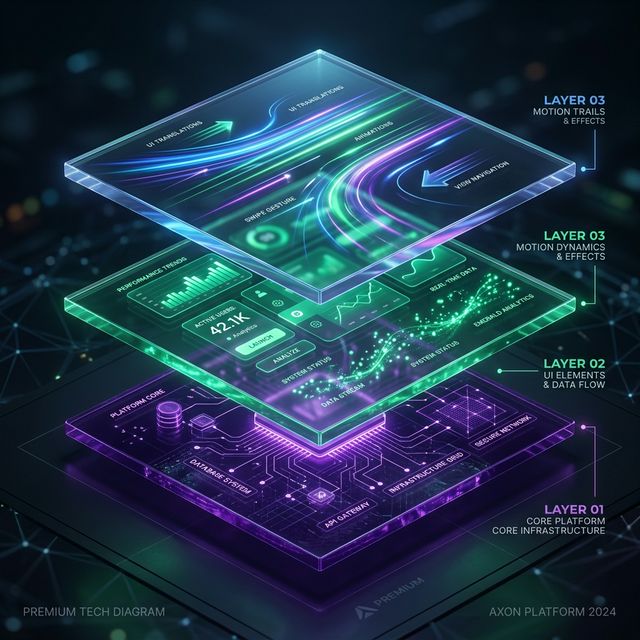
Think in Layers (The Secret Most People Miss)
Here's something we learned from building our video engine: The AI always works better when it understands what belongs in the foreground vs background.
Every video is made of layers. There's a background layer, content, and motion layer. When you write your prompt, think about each layer separately:
Background: "Dark background with purple gradient" is much better than "nice background"
Content: "Product image centered with large headline on top and CTA at bottom"
Motion: "Image does a slow zoom-in, text slides in from top"
🎯
Pro tip from the Nala team: When you upload an ad image for image-to-video, our AI already thinks in layers — separating background from text and animating each layer independently. The clearer the structure in your prompt, the better the result.
Work Scene-by-Scene (Not All at Once)
This is probably the most common mistake we see:
People try to describe an entire 30-second video in one long message. That's like asking a chef to cook a 5-course meal simultaneously — the result is messy.
Instead:
Start with a first message describing the overall concept
Let the AI generate a first version
Refine scene-by-scene: "Change scene 2 to..." or "Add a CTA at the end"
This approach gives you higher quality and fewer errors. True for complex videos too — build them step by step.
Pro Glossary: Keywords the AI Actually Understands
Here are keywords that give you precise control over the output. For each one, we've added when to use it — because knowing the term is half the battle:
Motion & Animation
Zoom in / Zoom out — Slow approach or retreat. Best for: dramatic openings, product reveals, building tension
Parallax — Layers moving at different speeds, creates depth. Best for: premium product videos, real estate, luxury presentations
Slide in from left/right — Elements entering from the sides. Best for: feature reveals, comparisons, fast-paced TikTok
Scale up — Element growing from a small point. Best for: logo reveals, bold CTAs, surprise moments
Spring animation — Physics-based animation with bounce, feels organic. Best for: high energy, sales, promotions, app demos
Style & Mood
Dark mode / Light mode — Dark or light color scheme. Dark mode feels premium and techy; Light mode feels clean and approachable
Gradient — Gradual transition between colors. Best for: modern backgrounds that don't distract from the content
Cinematic — Film-like feel, shallow depth of field, slow movement. Best for: brand stories, emotional narratives, luxury real estate
Minimalist — Clean, lots of whitespace, few elements. Best for: SaaS, tech products, businesses wanting a professional feel
Premium / Luxury — High-end feel, gold or dark tones. Best for: jewelry, fashion, fine dining, watches
Corporate — Professional and restrained, muted colors. Best for: B2B presentations, finance, consulting
Scene Structure
Hook scene — Opening scene that grabs attention. Critical for: any social video — you have 1.5 seconds before they scroll past
CTA (Call to Action) — Closing scene with a call to action. Essential in: every ad, landing page video, or promotion
Lower third — Small text at the bottom of the screen. Best for: brand names, contact info, titles
Text overlay — Text placed on top of the image or background. Best for: headlines, pricing, key messages
Split screen — Screen divided to show two things side by side. Best for: before/after, product comparisons, problem vs. solution
💡 Pro tip: You don't need to use all these keywords. Pick 2-3 that describe what you want, and the AI will build around them. Winning combos: cinematic + zoom in for dramatic openers, minimalist + fade in for SaaS videos, or spring + dark mode for high-energy sales.
Not every video works the same on every platform. Here's what we've learned about the key differences:
TikTok & Instagram Reels (9:16)
Short and aggressive. 5-15 seconds is plenty. You need a strong hook in the first second — otherwise they scroll
Big text in the center. Most viewers watch without sound. The text needs to tell the story on its own
High energy. Spring animations, fast transitions, bold colors
Example prompt: "10-second ad for running shoes, energetic and fast, big centered text, attention-grabbing hook, 9:16 for TikTok"
YouTube (16:9)
More room to breathe. 15-30 seconds — viewers give you more time here
Cinematic feel. Slow zooms, cinematic gradients, and subtle motion work beautifully
Narrative structure. Hook → Problem → Solution → CTA. There's space to develop the story
Example prompt: "20-second brand video for a SaaS company, dark mode, cinematic, charts filling up with animated data, 16:9 for YouTube"
Instagram Stories & Facebook (1:1 / 9:16)
Clean and branded. Your logo needs to be present. Brand colors should pop
Clear CTA. "Swipe up," "Order now," "50% off" — direct and large
Square format works well. 1:1 gets the most real estate in the feed
Example prompt: "Square ad for a restaurant, warm mood, food photos centered, large CTA at the end, premium style, 1:1"
Mistakes That Cost You (And How to Fix Them)
Mistake #1: Being Too Lazy
"Make a video for my restaurant" — that's not a prompt, that's a wish. The AI will fill in all the details itself, and the result probably won't match what you imagined.
The fix: Give vibe and intent. "Short ad for an Italian restaurant, warm and romantic mood, jazz music in background, 9:16 for Reels" — now the AI has something to work with.
🔮
On laziness: We're working toward a platform that eventually delivers stunning results even from minimal prompts. But right now — the more context you provide, the faster you get something great.
Mistake #2: Describing Design Instead of Vibe
"Put white text at 48 pixels in the top-right corner with a 2-pixel shadow" — that's too specific in the wrong way.
The fix: Describe what you want to feel, not how to build it. "Bold headline with a premium feel" will produce a better result than pixel-perfect instructions. The AI understands design — let it do its job.
Mistake #3: Cramming Everything Into One Message
"Create a 60-second video with 8 scenes including a complex animated intro, 3 different products, scrolling text, special transitions between every scene, and a before/after segment at the end" — that's a recipe for failure.
The fix: Break it into steps. "Create a short ad for 3 products, clean modern style." Once that's done — "Now add a before/after animation at the end." Your video quality will be significantly higher.
How to Work Smart and Save Credits
Here's a trick most users only discover after they've burned through half their credits: most AI video tools offer different models — and choosing the right one for each task is the difference between finishing the month with credits to spare and running out by week two.
The rule is simple:
Creating from scratch = Pro. When you're building a new video or making major structural changes, you need the powerful model. No shortcuts here
Small edits = Flash. Changing a background color? Updating text? Moving an element? There's zero reason to pay Pro pricing for that. Flash handles it and costs a fraction
Users who understand this difference save 30-50% of their credits. That's worth an extra month or two of free content creation.
Bad Prompt vs. Good Prompt: Real Examples
Example 1: Product Ad
The Generic Wish
👤
"Make a video about coffee"
🤖
Generates an off-brand, generic video...
The Problem: The AI has to guess the mood, format, and campaign goal. The result will likely be cliché.
The Precise Prompt
👤
"15-second ad for a specialty coffee brand. Warm mood, golden lighting, slow zoom-in on latte art. Premium feel. 9:16 for Reels."
✨
Generates an exact, premium video ad...
Why it works: Specific about length, mood, motion, and style. The AI knows exactly what the goal is.
Example 2: Sale
The Generic Wish
👤
"End of year sale"
The Precise Prompt
👤
"End-of-year sale ad, 50% off. Aggressive hook that grabs attention, red and white tones, strong CTA at the end. 3-4 scenes. 9:16. Energetic and urgent."
✨
Generates a high-converting video...
Why it works: Gives vibe (energetic and urgent), colors, structure, and format. A clear recipe.
Example 3: SaaS / Tech
The Precise Prompt Required
👤
"Short demo for an analytics dashboard. Dark mode with blue-purple neon accents. Charts filling up with animated data. Corporate and premium feel. 16:9 for YouTube."
✨
Why it works: Combines style (dark mode, neon), motion (animated charts), and format. Thinks in layers.
What Makes a Prompt Great? Summary
Vibe and intent — Describe the feeling, not the pixels
Think in layers — Background, content, motion
Work in steps — Don't try to build everything at once
Specify format — 9:16, 16:9, or 1:1
Use keywords — parallax, cinematic, zoom, spring
Save credits — Flash for small edits, Pro for creation
Ready to put this into action?
Start with 100 free credits. No credit card required. Make sure your first prompt includes vibe, format, and scene structure.